
How a Brand Campaign Built Its Visual Pitch with GPT Image 2.5

The campaign was approved, the copy was ready, and the visual direction was still unclear. The brand team needed several creative options quickly. The designer needed to show real images in the meeting, while the marketing team wanted to test a softer background, a stronger seasonal mood, and a more distinctive composition around the same product.
This is how a skincare brand used DataEyesAI gpt-image-2.5-sunburst to develop its campaign visual. The result did not come from one perfect prompt. It came from a short review cycle: reference assets, three visual directions, controlled edits, and channel adaptations.
The brief was more specific than “make it look premium”
The campaign was built around a summer hydration theme. The brief contained three non-negotiable requirements:
1. Keep the bottle proportions and color accurate;
2. Create a fresh mood without using a generic blue water-splash template;
3. Adapt the same visual language for a website banner, social post, and printed poster.
The team supplied a product reference image, a brand color palette, two material references, and a short list of elements that must remain unchanged. Product copy, price, and campaign dates were reserved for final layout so the information would stay exact.
The first review was about directions, not final artwork
Instead of requesting a finished poster, the team asked GPT Image 2.5 Sunburst to explore three directions.
Direction A: Glass and mist
The product sits between translucent glass and fine water mist. The cooler lighting emphasizes freshness and hydration.
Direction B: Soft fabric
The product rests on pale fabric with natural folds and shadows. The mood is warmer and more suitable for social content.
Direction C: Abstract liquid light
Purple and coral liquid forms surround the product. The image uses fewer literal water cues and feels closer to a distinctive brand campaign.
The goal of this round was to make the creative discussion concrete. Instead of saying “make it more premium,” the team could say, “keep the colors from C, but use the softer lighting from A.”
Three creative directions: glass and mist, soft fabric, and abstract liquid light

The selected direction was refined with three controlled edits
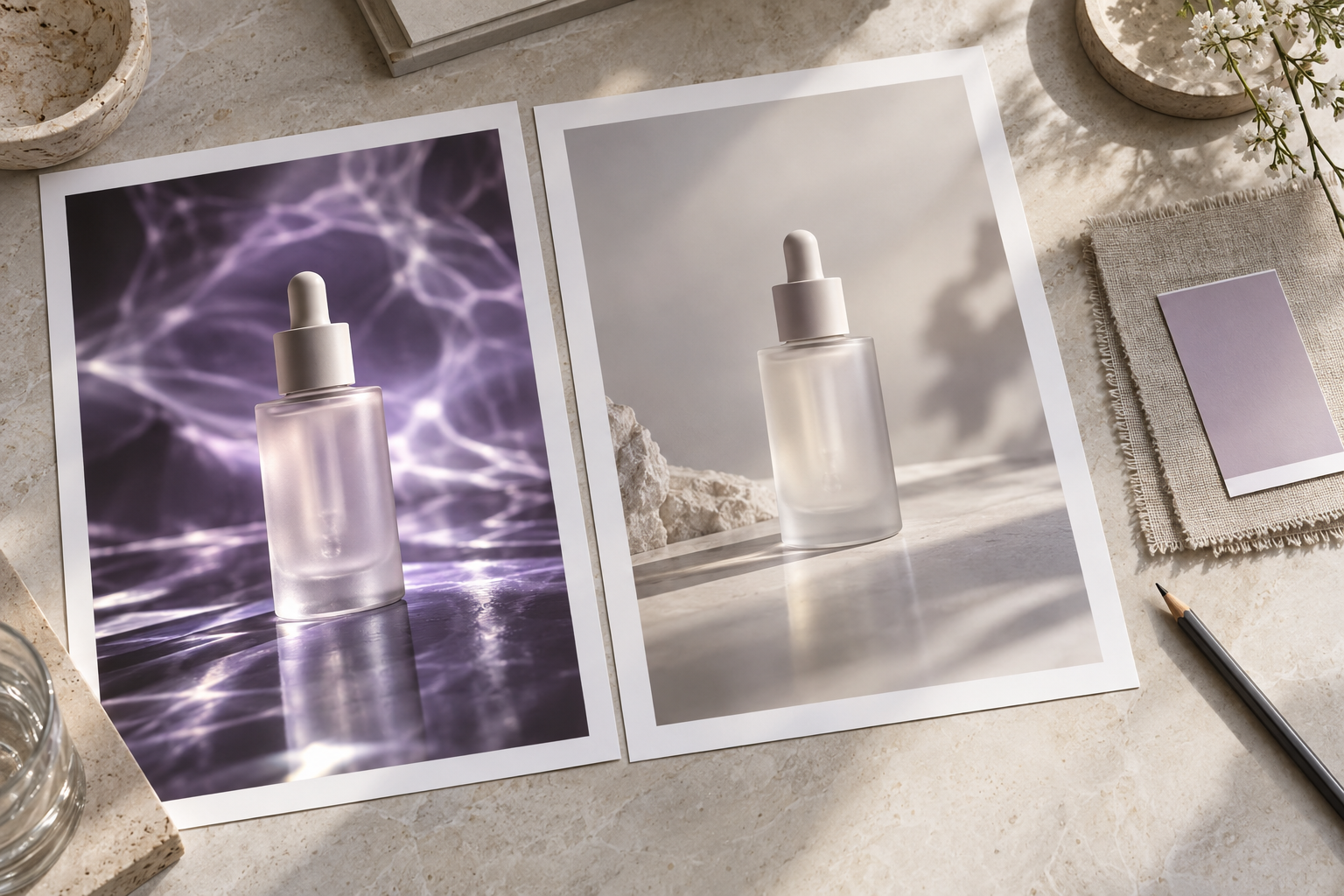
The team chose Direction C. The first draft still had three problems: the background was too dominant, the bottle highlight was too strong, and the product needed more breathing room.
The designer kept the approved product and composition, then asked the model to change only those areas:
Keep the product bottle from the reference image, including its color, proportions, and overall composition.
Change only these three elements:
1. Lower the contrast of the abstract liquid light;
2. Reduce the front highlight on the bottle;
3. Add clean pale space to the left of the product.
Do not add text, logos, prices, or extra products.
This approach kept the discussion focused on one evolving visual. The DataEyesAI model listing describes gpt-image-2.5-sunburst as optimized for precise edits, reference-image fidelity, and consistency across multiple editing rounds, which fits this type of review cycle.
Controlled refinement: the same subject with changes only to background contrast, highlight, and left-side negative space
One visual language became three channel versions
Once the main artwork was approved, the team prepared three layouts:
Website banner
Composition change: Shift the product right to create headline space.
What stayed consistent: Product proportions, palette, and overall visual language.
Social square
Composition change: Center the product and reduce empty space.
What stayed consistent: Main lighting and brand palette.
Printed poster
Composition change: Add space above and below for final layout.
What stayed consistent: The relationship between the product and background.
The model handled composition and visual extension. The designer added the exact headline, campaign date, QR code, and price in the final file. This separation made the workflow faster while keeping required information accurate.
One visual language adapted for a website banner, social square, and printed poster

What changed in the production process?
Previously, the team needed a creative meeting, several rough sketches, and another review before it could discuss a concrete direction. This workflow brought the first visual options into the same meeting:
Marketing could compare three directions on the same day;
The designer spent more time refining the selected option;
Brand reviewers could request specific changes to a visible image;
One approved visual language could extend across several channels.
The main benefit was less communication and rework, rather than image generation speed alone.
Starting the same workflow in DataEyesAI
Open the DataEyesAI model marketplace, select gpt-image-2.5-sunburst, and upload the reference image. Begin with creative directions, then use iterative edits for the background, lighting, and local details.
DataEyesAI provides unified model access with usage-based billing. Teams can manage text, image, and other multimodal tasks through the same platform. Check the latest pricing and console information before production use.
Three mistakes this workflow avoids
Requesting the final poster in the first prompt. Creative exploration, layout, and information accuracy become mixed together, which makes changes expensive.
Regenerating the entire image for every revision. Approved proportions, lighting, and style can drift between versions.
Asking the model to render exact campaign text. Logos, prices, dates, specifications, and promotion rules should be added in a design tool after the image is approved.
Closing note
The practical value of GPT Image 2.5 Sunburst is visible creative communication and controlled iteration. A brand team can see several directions, refine one shared visual, and hand the approved image to a designer for accurate final layout.
That workflow is useful for product launches, seasonal campaigns, social series, and advertising pitches where the team needs to move from an abstract idea to a reviewable visual quickly.
You might also be interested
How to Use DataEyesAI for AI Video Generation: From Text-to-Video to a Content Production Pipeline
DataEyesAI helps teams turn ideas into repeatable AI video workflows.

Is Wan 3.0 Video Good for Ecommerce? DataEyesAI Product Ad Cases
DataEyesAI Wan 3.0 Video turns product images, brand assets, and creative scripts into high-quality
Empowering OpenClaw: Five APIs from DataEyesAI to Help AI Agents Truly "See the World"
Empowering OpenClaw: Five APIs from DataEyesAI to Help AI Agents Truly "See the World"